International Shipping Settings
Choose whether group products are split into separate lines in the customs data sent for international shipments.
What This Setting Does
The International Shipping setting decides how group products appear in the data Helm sends to your courier for international shipments. That data feeds the customs declaration and commercial invoice, so it matters every time a parcel crosses a border.
There is one option: Split group items on export. When it is on, each item inside a group is listed as its own line, with its own cost price. When it is off, the group travels as one line.
Example: you sell a gift box that contains a candle, a mug and a tea tin, set up in Helm as a group product. With splitting on, the customs data for a shipment to the US shows three lines, each with its own description, value and customs details. With splitting off, it shows one line for the gift box.

Before You Start
You need access to Settings > Despatch Settings in Helm.
The setting only affects products set up as groups. If you have not used groups yet, read Group Products: Families and Containers first.
Splitting only helps if each item carries its own customs details. Check that commodity codes, country of origin and descriptions are filled in at item level. See Manufacturers or Item-Level Customs Data for US and EU.
Missing cost prices: if items inside a group have no cost price of their own, Helm divides the group's total cost between them. Every line still gets a value, but it may not match the real value of each item, so add item cost prices wherever you can.
How to Change the Setting
Go to Settings > Despatch Settings.
Open International Shipping.
Turn Split group items on export on or off.
Click Save.
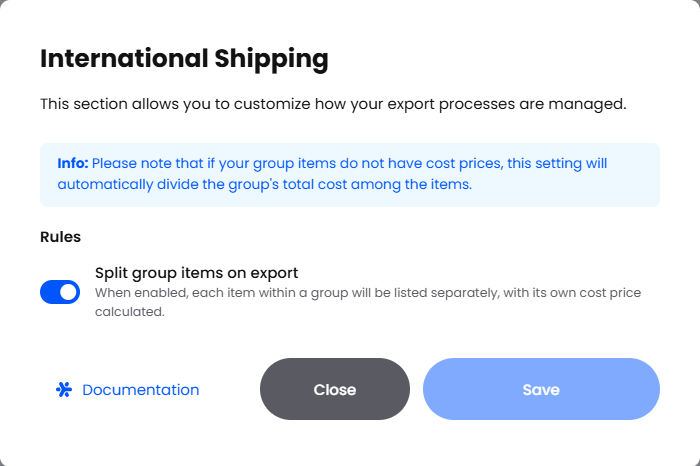
The change applies to shipments booked after you save. Labels that have already been printed keep the data they were booked with.
When to Split or Keep Groups Whole
Best Practices
Add item cost prices. This avoids the automatic split of the group's cost and gives customs accurate values.
Keep customs data at item level. Commodity codes, country of origin and clear, specific descriptions should be set on each item, not just on the group.
Test before you rely on it. After changing the setting, book one international shipment with a group product and check what was sent in the Request Body in Courier Logs.
Tell your team. Changing this setting changes the customs paperwork for every international shipment with a group, so let anyone who handles customs queries know.
Tip: if a courier rejects or queries an international shipment, Courier Logs show exactly which lines and values Helm sent, which makes it quick to see whether the group was split.
FAQ
Does this setting affect domestic shipments?
Does this setting affect domestic shipments?
It is designed for the export data sent with international shipments, where customs information is needed. Domestic shipments do not carry a customs declaration.
What happens if my group items have no cost prices?
What happens if my group items have no cost prices?
Helm divides the group's total cost between the items, so each line still has a value. For accurate declarations, add a cost price to each item.
Will changing the setting update orders that are already despatched?
Will changing the setting update orders that are already despatched?
No. Shipments that have already been booked keep the data they were sent with. The setting applies to shipments booked after you save.
How can I check what was sent to the courier?
How can I check what was sent to the courier?
Open Courier Logs, find the shipment and look at the Request Body. Each group item appears as its own line when splitting is on.
Do I need to set this per courier?
Do I need to set this per courier?
No. It is a single company-wide setting in Despatch Settings and applies to all couriers.
Once this is set to match the countries you ship to, Helm sends customs data in the shape your couriers and border agencies expect, with less back and forth over international parcels.
Was this helpful?
Still need help? Share an idea